every sport,
one assistant.
Your Garmin training in your assistant, through the official Garmin Connect Personal API. Read-only, nothing to install.
add it to your MCP client
Node.js 22 or later and a Garmin Personal API key. Set it up in three steps.
npx -y @indaco/garmin-personal-mcp@latest
ask in your own words.
In any language. Your assistant chooses the tools and can combine their data. Some examples:
running
Recovery goes with every sport: “How did I sleep this week, and how was my HRV?” uses
getSleep and getHrvRange.
your training dashboard, written by the server.
Your training load next to HRV, sleep and resting heart rate. The server writes the page from its template, and your assistant writes only the coach notes. The page is the same in every client.
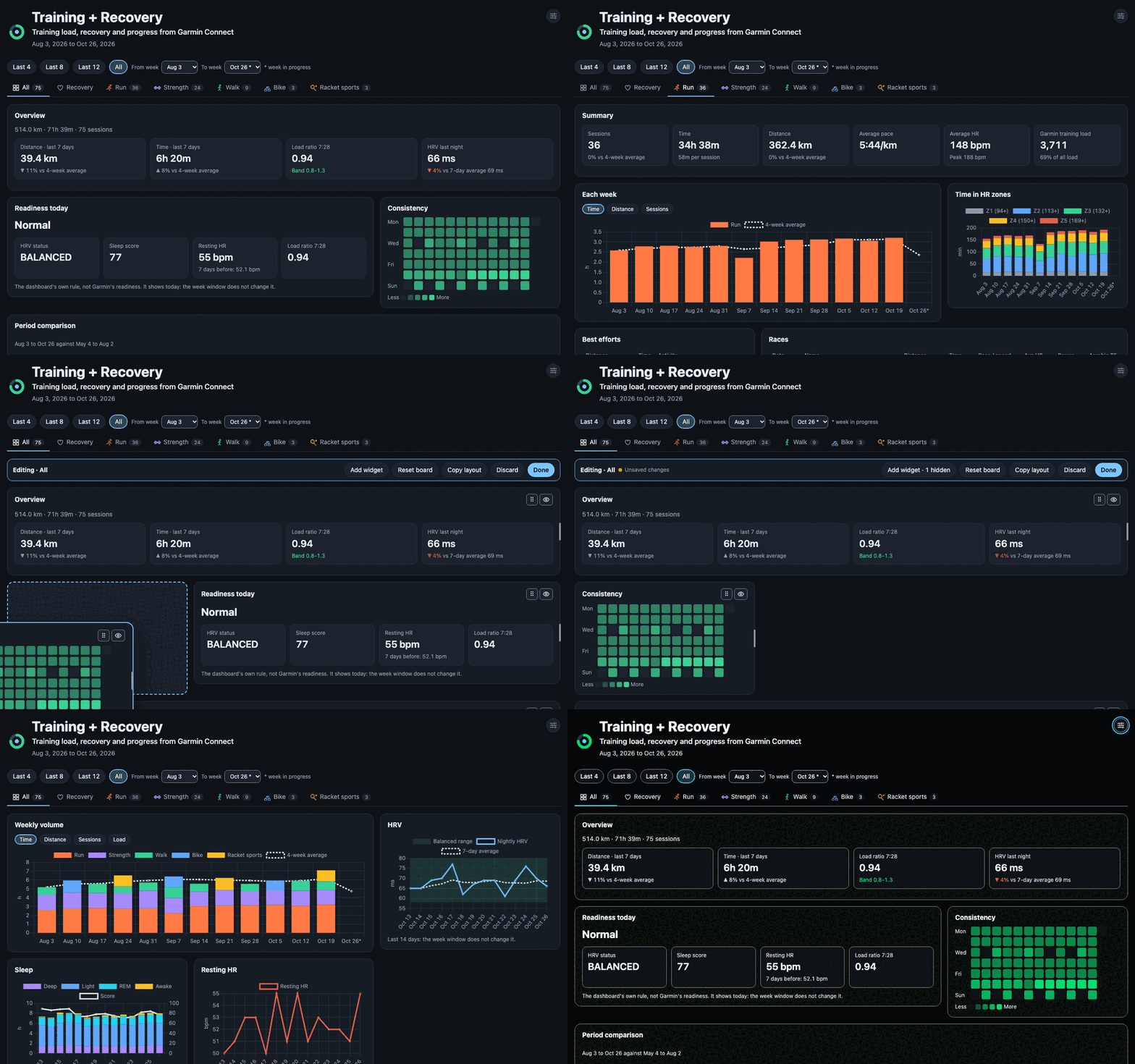
- one HTML file
- Works offline. Chart.js is inside, and the page's own code sends no requests.
- less than a minute
- with the preset or the blank layout.
- a board for each sport
- plus a board for all your training and a Recovery board. Move, resize, hide and add widgets.
- your layout stays
- An update replaces only the data and the coach notes. Updates can also run on a schedule.
- 13 themes, your languages
- six dark, four light, two high-contrast, and System. Munich and Munich dark use the colours of this site.
| prompt | what it does |
|---|---|
training-dashboard | makes the page |
training-dashboard-update | adds the new data, your layout stays |
dashboard-setup | makes a page for you or for your coach, with only the sports and the data that you select |
dashboard-widget | makes a new widget from your idea |
dashboard-language | adds a language to the page |
start in three steps.
You need Node.js 22 or later and a Garmin Connect account with access to the Personal API.
create a personal API key
Open the API key page in Garmin Connect web, select Create Key and choose the expiry. Garmin shows the key only one time. Save it in a file that only you can read:
mkdir -p ~/.config/garmin-mcp
nano ~/.config/garmin-mcp/api-key
chmod 600 ~/.config/garmin-mcp/api-key
You can also give the key in GARMIN_PERSONAL_API_KEY.
connect your client
Settings → Developer → Edit Config. Add a top-level
mcpServers key, then quit Claude Desktop fully and start it again.
{
  "mcpServers": {
    "garmin-personal": {
      "command": "npx",
      "args": ["-y", "@indaco/garmin-personal-mcp@latest"]
    }
  }
}This command adds the server to all your projects.
claude mcp add garmin-personal --scope user -- npx -y @indaco/garmin-personal-mcp@latest
The first npx download can take longer than the default start time. In
~/.codex/config.toml, set startup_timeout_sec = 60.
codex mcp add garmin-personal -- npx -y @indaco/garmin-personal-mcp@latest
Other stdio MCP clients: command npx, arguments
-y @indaco/garmin-personal-mcp@latest.
ask your assistant
Start a new chat and ask about your training. To make the dashboard, run the
training-dashboard prompt.
List my last 5 activities, with pace and heart rate.
The server stores the .FIT files and the dashboard in
~/workspace/garmin-data. Set GARMIN_DATA_DIR to use a
different folder.
19 tools, all of the Personal API.
Each tool returns JSON to your assistant. garminGet reads the endpoints that
have no tool of their own.
listActivitieseach activity with pace, HR, load and effect, by date, type or namegetActivitythe details of one activitygetActivityLapsthe laps of an activity, from its .FIT filegetActivitySetsthe strength sets of an activity, with the muscles, from its .FIT filegetActivityWorkoutsthe planned workout of an activity: steps, targets and notesdownloadActivityFitsaves the .FIT file of an activity in the data foldergetHrvRangeHRV during the nightgetDailyHeartRatethe heart rate of a day, with the resting HRgetSleepthe sleep of a night, or of up to 14 nightsgetWeightweight and body composition for a range of datesgetBodyBatteryhow Body Battery charged and drained, for up to 14 daysgetHeartRateZonesyour HR zonesgetFitnessAgefitness age against actual agegetDailySummarysteps, stress and Body Battery, for a day or a rangegetDashboardDataall the data of the dashboard in one call, with a local cachewriteDashboardwrites the dashboard pageeditDashboardchanges the layout, the custom widgets and the languages of the pagescheduleDashboardRefreshupdates a dashboard page automatically, at the times you say in your own wordsgarminGetall other GET endpoints of the Personal APIThe tools guide gives the endpoints, the details of each tool and the data that the Personal API does not have.
official and read-only
Uses the Garmin Connect Personal API. It writes nothing back to Garmin.
your key stays secret
The server sends the API key only to the Garmin token endpoint, and never logs or returns the key or the access token.
your files stay local
.FIT files and the dashboard are in your data folder. The page's own code sends no requests.
every stdio client
Claude Desktop, Claude Code, Codex and the other MCP clients that use stdio.